In today’s technologically-driven world, devices abound, each equipped with their bespoke lighting signals. One such ubiquitous signal is the blinking green light. At first glance, it may seem innocuous; however, it often communicates critical information regarding the status of a device. Understanding these signals is paramount for effective device management and troubleshooting. This article delves into the various devices exhibiting blinking green lights, elucidates their meanings, and explains what actions to take based on these signals.
To navigate the landscape of device indicators effectively, it is essential to categorically analyze the categories where blinking green lights are prevalent. Common devices where one might encounter such signals include routers, smart home devices, gaming consoles, and electric vehicles, among others. Each category has its unique blinking patterns and associated meanings, thus making the comprehension of these signals all the more necessary.
Routers and Network Devices
Among the most prevalent devices to indicate a blinking green light are routers and modems. A green light on these devices signifies a stable connection to the internet. However, when the light blinks, it often indicates data transmission. For many consumers, this is merely an indicator of activity—not signifying any fault or necessity for alarm. Nevertheless, if the blinker accelerates or exhibits irregular blinking, it may warrant further investigation into the nature of the connection.
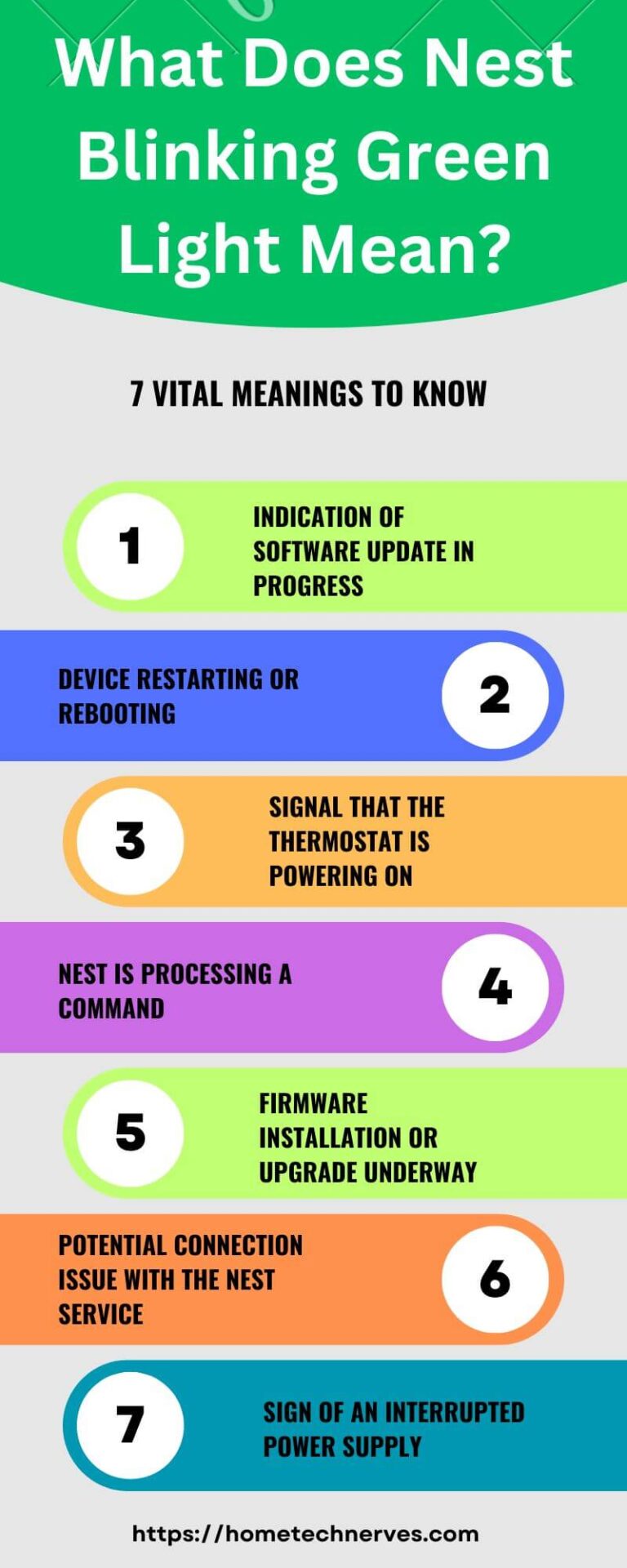
Additionally, a continuous blinking green light can indicate firmware updates or system diagnostics in progress. Executing a quick power cycle of the router can sometimes resolve connectivity issues following prolonged blinking. Thus, staying aware of blinking patterns can facilitate smoother internet performance.
Smart Home Devices
The emergence of smart home technology has introduced a plethora of devices that can communicate their operating status through colored lights. Smart speakers, thermostats, and security cameras frequently employ a blinking green light to convey important information. For instance, a smart security camera might exhibit a blinking green light when connecting to Wi-Fi, or while undergoing setup. In contrast, a stable green light could indicate that the device is functioning optimally and is connected effectively.
For devices like smart doorbells, a blinking green light may signal that the device is actively recording video or that it is in the process of pairing with a mobile application. These signals enable users to ascertain the operational state of their smart devices without the need for constant monitoring via an app interface.
Gaming Consoles
Gaming consoles have their own set of blinking light indicators, which can often puzzle even the most seasoned gamers. A blinking green light on consoles such as the PlayStation or Xbox may indicate a multitude of statuses. A slow blinking could signify that the console is in sleep mode and awaiting user interaction. Conversely, a rapid blink could denote an update is in progress or that the console is processing a command.
Users should be cognizant that a blinking green light might also indicate a hardware issue if consistent and unyielding. If the light refuses to stabilize, it might be prudent to consult the manufacturer’s troubleshooting guide, as further steps may vary depending on the model.
Electric Vehicles (EVs)
For electric vehicle owners, a blinking green light often serves as an essential signal regarding the charging status of the vehicle. A green, blinking light typically confirms that the EV is actively charging. In some cars, the rate of blinking can even indicate the remaining battery life or the current charging speed. Thus, monitoring these signals not only assures peace of mind but also allows for proactive battery management.
When the light transitions from blinking to solid green, it indicates completion of the charging cycle, signaling that the driver can safely disconnect and commence their journey. However, discrepancies in blinking patterns, such as excessive blinking or a transition to other colors, might alert the user to charging issues, requiring immediate attention.
The Importance of LED Indicators
LED indicators, while seemingly trivial, play a crucial role in our daily interactions with technology. They serve as the primary line of communication between users and devices. Diligently heeding the meanings behind these visual cues can not only enhance user experience but also prevent potential damage or malfunctions from neglected issues. Therefore, augments in understanding these signals cultivate not only efficiency but also an informed approach to technology utilization.
Additionally, one must be aware that while blinking green lights generally signify normal operations, they can change based on specific contexts. Each device has its operational nuances. Therefore, referring to the user manual or manufacturer’s guidelines becomes indispensable. When in doubt, these resources can demystify the numerous meanings behind the blinking lights.
Conclusion
In conclusion, a blinking green light is more than a mere decorative feature; it acts as a vital communicative tool. By deciphering its messages across various device categories, users can ensure optimal functioning and prompt problem resolution. The next time you encounter a blinking green light, remember: it is your device’s way of conversing about its status, and understanding this language will empower you to maintain control over your tech-savvy lifestyle.