In the realm of modern technology, the phenomenon of spooling is an often-misunderstood aspect of printing. The term “spooling” stands for “Simultaneous Peripheral Operations Online,” a rather technical nomenclature that belies its significance in the everyday workings of printers. As users sit down to print important documents, images, or studies, they may encounter the message that their printer is “spooling.” This common occurrence can evoke feelings of frustration, but to unravel this mystery, one must delve deeper into the intricacies of how printers operate.
To comprehend the spooling process, it’s essential to first grasp the relationship between software and hardware during a print job. When a user initiates a print command, the operating system takes charge, sending the document to the printer. However, unlike immediate action one might expect, this communication often involves a complex interplay. The operating system diverts the print job into a spool file, a temporary storage location on the computer’s hard drive. This file awaits the printer’s readiness, allowing users the convenience to continue with their tasks while waiting for the printing process to unfold.
Interestingly, spooling is not merely a placeholder; it optimizes the overall printing experience. It enables multiple print jobs to be queued for processing, ensuring that a backlog of requests can be handled efficiently. This queueing mechanism underscores the custom-built narrative of contemporary printers—they are designed not just to print, but to manage a flurry of requests while maintaining order.
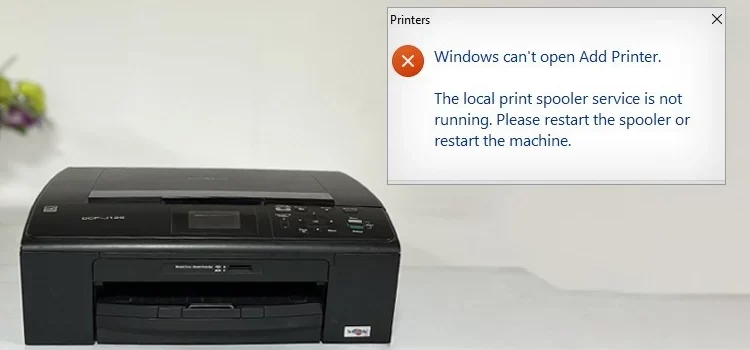
However, while spooling has its advantages, it can also lead to a myriad of errors. One may encounter situations where an error message appears, indicating issues such as “printing stalled” or even “printer not responding.” In these moments of uncertainty, it becomes critical to investigate common printing errors associated with spooling. Anomalies can arise from various sources, including driver conflicts, network connectivity issues, or even corruption of the spool file itself.
Driver issues are particularly prevalent among users. Print drivers act as the bridge between the computer and the printer, translating digital information into a format that can be understood by the hardware. If a driver is outdated or incorrectly installed, it can lead to a halt in the spooling process, leaving users perplexed. Regular updates and installations from the printer manufacturer are vital to ensure seamless communication between systems, essentially fortifying the integrity of each print job.
Network issues also bear significant influence over spooling dynamics, particularly in office settings where multiple users rely on a shared printer resource. A fluctuation in network connectivity can interrupt the smooth flow of data to the printer, leading to a backlog within the spooler. Users might find themselves in a predicament where print jobs stack up, requiring intervention either by restarting the device, checking the network, or even purging the print queue entirely.
Moreover, the corruption of spool files can introduce layers of complications. A corrupted file can prevent a job from being executed, resulting in perpetual errors. Recognizing the symptoms of a corrupted spool file is pivotal. Users might notice incomplete print jobs or statements that appear to be “in progress” indefinitely. Tackling this issue often requires the purging of the spooler—cleansing it of all tasks before restarting the service to restore functionalities.
Ultimately, it becomes clear that the spooling process is not merely an innocuous or benign aspect of printing; instead, it serves as a vital cog in the machinery of printing technology. Understanding the relevance of spooling can demystify the user’s experience, converting confusion into control. As users become more familiar with the potential pitfalls and idiosyncrasies of the spooling process, they can alleviate their frustrations and strategize solutions to common challenges.
In an era where swift communication and instant gratification reign supreme, the printer’s spooling phenomenon reinforces the point that patience and understanding are key. Falling prey to the urge to repeatedly cancel and resend print jobs can only aggravate the situation. Instead, informed users will take a proactive stance, assessing driver updates, evaluating network connectivity, and reviewing spool file integrity before attempting further action.
In conclusion, the spooling process, often shrouded in mystique, is a foundational element in the modern printing landscape. By transcending the superficial understanding of this mechanism, users can unveil a deeper appreciation for the convergence of technology and user experience. Whether through troubleshooting or enhancing their awareness, the intersection of spooling and printing errors invites a contemplative exploration of our reliance on technological infrastructures. As we continue to navigate this intricate relationship, a robust understanding of spooling not only enriches the process but ultimately empowers users in their daily administrative tasks.